


Page layouts provide structure to your page — two-column, three-column, and more — making it
easy for everyone in your organization, first-time and power users alike, to create beautiful pages.
- Edit the page.
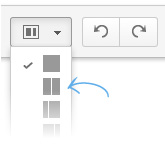
- Click the Page Layout button in the editor toolbar. It looks like this:

- Select the Two-Column page layout.
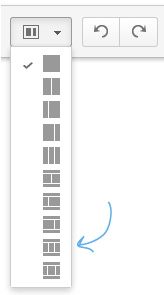
- Select the Three-Column with Header and Footer page layout.
- Use your cursor (or press Ctrl+A or Cmd+A) to highlight all the content in this page layout block.
- Copy and paste this content into the center and right-hand content blocks.
- Click Save.



0 Comments